Showing posts with label Mobile Perspectives. Show all posts

Thursday, September 6, 2012

Eating Our Own Mobile Dog Food

Back in February, I wrote about my plans to attend Social Media Week New York and about Mobile Perspectives' role in building Social Media Week's mobile website. 

Social Media Week itself is a worldwide event exploring the social, cultural and economic impact of social media. Their mission is to help people and organizations connect through collaboration, learning and the sharing of ideas and information.

During February's Social Media Week, more than 1000 events were held in 12 host cities on 5 continents. September's event takes place in 14 cities, including here in Chicago from September 24-28.

I'm glad I went to SMW NY - the events I attended were well organized with great content and compelling speakers and panelists.  It was also a great opportunity to use the SMW Mobile Website and SMW Mobile Apps as any other attendee would. As a visitor to New York - I was especially grateful for the maps within the event descriptions to help get me from venue to venue.

It was also a great opportunity to see what we could do better - from navigating the event schedule, to accessing more local content, to providing a better integrated experience for attendees using both the SMW mobile website and the SMW mobile apps.

Ahead of the September event, we've worked closely with CrowdCentric (SMW's global coordinator), XOMO Digital (the SMW Mobile Application developers), Techliminal (responsible for the core SMW web and registration platforms), New Media Innovation (our technology platform partner) and with other SMW partners to improve the on-the-go attendee experience.  You can read more about our efforts in Social Media Week's recent blog post "Enhancing The SMW Mobile Experience".

Mobile Perspectives will also be hosting a panel discussion on "Social Media & Mobile: Is Your Social Media Strategy Mobile-Ready" during Social Media Week Chicago on September 27th.


Make sure you visit http://www.socialmediaweek.org to see if Social Media Week is coming to your city. For those of you in Chicago, check out the schedule here - events are filling up fast!

I hope to see you there!

Comments below, email me at todd@mobile-perspectives.com, follow me (@toddshingler) on Twitter or reach out via our website.

Friday, August 10, 2012

Moonpie Takes Gold in Mobile Marketing QR Code Olympics

QR Codes offer brands a way to engage consumers with a compelling mobile experience – linking to interesting videos, enabling consumers to engage the brand on Facebook or Twitter, enabling participation in contests, or linking to relevant information about a product on a mobile website.

I’ve noticed that QR Codes are increasingly showing up in my grocery bags. In the last few weeks, I’ve found QR Codes on bananas, pineapples, strawberries, bags of lettuce and Moonpies.

Curious, I pulled out my iPhone and scanned the QR codes to see what would happen. As a mobile call-to-action, you would expect the resulting engagement to be mobile-optimized, wouldn’t you? After all, a QR is a mobile call-to-action, right? It’s not like consumers are scanning QR Codes with their laptop or on their home computer. Unfortunately, most of the QR codes led to engagements that could have been better.

In the spirit of the London Olympics, I’ve awarded medals for the best mobile engagement triggered by a QR Code, highlighting deductions where the engagement could be improved.

Bronze Medal goes to Frontera Pineapples!
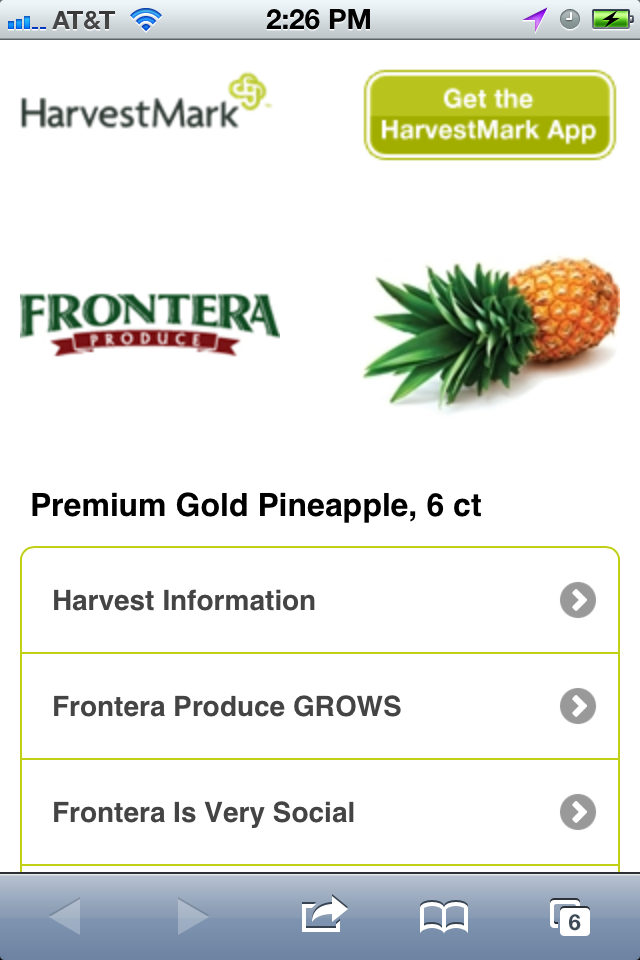
The tag on the Frontera pineapple included a QR code and an invitation to ‘Connect to the Farm’. Scanning the QR Code takes you to a mobile website containing harvest information (showing how long it took to go from being picked to being in your bag), basic information about Frontera Produce, a page with links to Frontera’s social media presence and a link to pineapple recipes.


First deduction: goes to the call-to-action: “Connect to the farm” isn’t a very compelling ‘call-to-action’ – it’s unclear what the incentive is for someone to scan the QR code – I’d guess very few people have responded to this generic call to action.
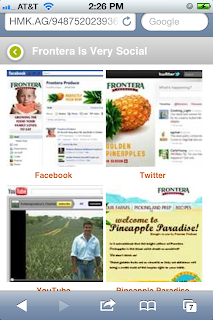
Second deduction: the page connecting to their social media presence should have simply included standard social media call-to-action icons (e.g. Facebook’s Like icon or Twitter’s Follow icon) or should have been eliminated in favor of putting the social media icons on the landing page. Further, the images shown are from the full social media websites instead of from their mobile websites. The last image goes to their non-mobile-friendly website (without a ‘full website’ handling warning).

Third deduction – the links on the recipes page simply opens non-mobile-optimized pages on Frontera’s main website.
Easy steps to improve: Use a more compelling and descriptive call-to-action, simplify the site by including social media icons on the landing page and mobilize a few recipes rather than redirect to their non-mobile-friendly website.


Silver Medal goes to Dole Bananas!
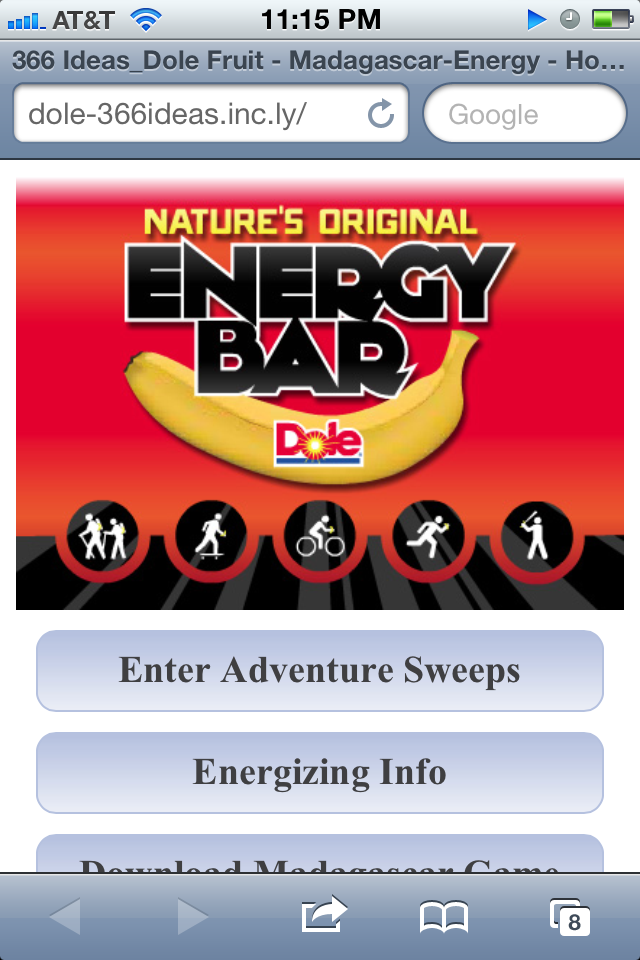
Right on the label, Dole sets the expectation that I’ll be able to enter the Nature’s Original Energy Bar Adventure Sweepstakes simply by Scanning the QR Code.
Scanning the QR Code leads to a decent mobile website, with mobile-friendly nutritional information and recipes pages, a link to a Madagascar game (for unobvious reasons) and a link for entering the Sweepstakes.


First deduction: Entering the sweepstakes isn’t so easy. You have to connect via Facebook and ‘Like’ Dole to enter. If you aren’t on Facebook, you can’t enter the competition.

Second deduction: Because of the way they built their Sweepstakes app, you are forced to use the ‘non-mobile-friendly’ version of Facebook to access the sweepstakes app and go through non-mobile-friendly Facebook sign-in and acceptance screens before finally getting to the mobile-friendly Adventure sweepstakes signup form.


Had they built their sweepstakes app to point instead to the mobile facebook page, you would see mobile-friendly pages -making the signup / acceptance process more mobile-friendly.

[Note: If you are logged in to Facebook's mobile website, you don't see the login and acceptance screens. Presumably, most iPhone users access Facebook via the Facebook app and would be forced to login – or would abandon.]

Eventually, you get to a mobile –friendly page where you can enter the sweepstakes by enter your name, address, date of birth and email address. Once finished, you are prompted to share that you’ve entered on Facebook.


Why Silver? Dole set the bar higher than Frontera and delivered on a number of levels – Had they configured their Facebook plug-in differently, they might have taken Gold. That said, if the goal is to drive up Facebook ‘likes’ that could have been accomplished much more easily!

Gold medal to Moonpie!
Did you know they still made Moonpies? Well, they do. And there is a QR Code right on the wrapper encouraging you to find them on Facebook. 
If you scan the QR Code, you get a very simple mobile page with an embedded Facebook plug-in where you can ‘like’ them.

Deductions: As with Dole, Moonpie uses the default Facebook Social Plug-in settings to force you to login via a non-mobile page instead of the mobile login screen. However, since there was no additional ‘App’ to authorize separately, the ‘Like’ button worked once logged in – and without being redirected to their Facebook page.

Nothing fancy, but it (mostly) works. Sometimes the best strategy is to do a solid job and let the competition land on their head…just like in the Olympics!

Failing to medal: California Giant Strawberries and Fresh Express Lettuce


California Giant Strawberries QR Code urges you to ‘Check us out today’. When you scan the QR code, you get what appears to be a pretty nice mobile website…only it isn’t.


The Pinterest ‘Pin’ link goes to their YouTube Channel – as does a subsequent link to ‘Share recipes’ with them. The 'Play It Again Sports' promotion links to a non-mobile-friendly promotions site powered by Wildfire - and not to the promotion mentioned. The 'Game Day Recipes’ (and a later set of recipe links) goes to the recipes section of Cal Giants non-mobile-friendly website.

Fresh Express Lettuce encourages you to scan the QR code to get delicious recipes and more. Unfortunately, scanning the QR code simply takes you to their full website. One scan led to a non-mobile-friendly QR promotion page. A subsequent scan simply redirected to their full website.


Marketers: Don't use QR Codes unless it triggers Mobile-Friendly Engagement!
Don’t stick a QR Code on everything just because you can. If the post-scan experience isn’t engaging, mobile-optimized and designed to encourage subsequent engagement, leave the QR Code off rather than risk disengaging consumers instead.

As with any marketing campaign, have a clear goal in mind and use QR Codes (along with other mobile and non-mobile calls-to-action) to help achieve your goal - whether it’s to drive Facebook ‘Likes’, gain Twitter followers, acquire email addresses, educate consumers or enhance your brand image.

[Side Note to Kelloggs: By the time I downloaded and installed the ‘SpideySense’ iPhone app and spent 5 minutes getting the Augmented Reality marker on the Rice Krispies box to do something, my kids were no longer interested in the 30 second movie clip. Did you know you can simply use a QR Code to launch a video on YouTube? It would’ve saved me a lot of effort.]


Comments below, email me at todd@mobile-perspectives.com or follow me @toddshingler on Twitter.

Friday, May 18, 2012

Unlimited Wireless Data Plans Heading for Extinction

The explosive growth of mobile data consumption driven by smartphone and tablet adoption and the roll-out of faster wireless data networks is speeding the move towards usage-based mobile data plans.
 
Mobile consumers are increasingly downloading books, streaming movies, watching videos, and listening to cloud-based music services such as Spotify and Pandora.  Growing use of internet voice services like Skype and Google Voice and text messaging alternatives such as iPhone messenger and now Facebook messenger consume mobile data AND directly eat into wireless operator voice and text messaging revenues.
Consider some of these Mobile Statistics:
  • 600M YouTube video views each day from mobile devices
  • 2.6B mobile applications were downloaded in March 2012
  • 8.5% of all internet traffic is now from mobile devices
  • 15% of all ‘search’ traffic is from mobile devices
  • 70% of Pandora’s listening hours are from mobile devices
  • 54% of Facebook’s 901M users access Facebook from their mobile device each month
Clearly, wireless operators don’t want to simply provide the bandwidth for everyone else to profit from and they are looking for ways to capitalize – particularly as traditional voice revenues continue to drop and even as their own cost to transmit data (on a per GB basis) continues to decline. The first step, already playing out, is the move away from unlimited data plans.
Verizon and Comcast End Unlimited and Capped Data Plans
Yesterday, a Verizon executive made a statement that mobile customers that currently have unlimited data plans would have to move to a tiered usage-based data plan if they wanted to upgrade to a 4G LTE device.  Verizon, like AT&T before it, no longer offers unlimited data plans to new subscribers and has no doubt been thinking about the best time to cease unlimited data plans for existing customers as well.
Not surprisingly, Verizon received a backlash of negativity from customers and as of this morning seemed to be backing off the statement – instead indicating that they are reviewing pricing plans and will announce them well in advance of implementing them.
Coincidentally, Comcast announced yesterday that they were ending their ‘hard cap’ of 250GB for home internet subscribers and were now running trials where customers were given a nominally higher data allowance (300GB) with $10 overage fees for each additional 50GB of data consumed.
Both moves are further evidence that unlimited data plans will inevitably be replaced by usage-based data plans.
Beyond Unlimited and Usage-based Data Plans
From a wireless operator perspective, much of the rest of the world has already adopted usage-based data plans, so Verizon’s intentions aren’t without precedent. That said, the simple “data usage” model is likely to evolve to better reflect how mobile consumers are using their mobile devices. 
These “consumer pays” models are also likely to be supplemented with more creative – and lucrative - “shared cost” and “sponsored cost” models allowing wireless operators to charge content providers for using their networks or for prioritizing their data traffic.
A few directions wireless operators could explore:
  • Capped 'best-effort' plans - which would allow basic email, internet, downloads without a guarantee on bandwidth quality and speed and with max monthly data limits. Streaming video usage would be 'best-effort' and in certain instances blocked if there was network congestion.
  • "Premium" plans that would have faster speeds and better quality video by prioritizing data consumption by these users above the basic 'best-effort' plans. e.g. my streaming video always works but yours may be blocked when there is network congestion. As Comcast is doing on the wireline side, these plans would likely have upper thresholds on monthly usage with overage charges.
  • “a la carte” fees where users could be asked to pay extra fee for specific services, e.g. for streaming video - either unlimited video for a premium fee or a certain amount of streaming video for a lower price. This might even by charged per GB if you aren't on the 'unlimited' video plan.
  • Ditto for over-the-air “app store” downloads and cloud-based storage services like iCloud
  • Given mobile social media consumption, I could see operators offering plans similar to unlimited text plans.  $5/month for unlimited access to Facebook, Google+, etc.
Wireless operators may also look to get data usage subsidized by the companies generating the most data traffic by:
  • Striking deals with Apple, Google, Amazon, Netflix, Hulu, YouTube etc. to subsidize users wanting to download or stream content (apps, music, video) over the operator network. This could range from simple licensing fees, to variable fees based on usage to getting a piece of each individual item 'purchased' - e.g. they get $.05 of each $.99 song or app downloaded over their network to asking for a piece of advertising revenue these companies are collecting over the operator network.
  • Seeking the right to inject or overlay their own ads into the content so they can generate their own additional advertising revenue.
  • Striking similar licensing deals directly with Facebook, Twitter, Google+ etc. to 'prioritize' or 'subsidize' use of these networks over the operator network.  Why wouldn't wireless operators ask the social networks for a piece of ad revenues generated on their networks?
  • Seeking profit-share relationships with Retailers. Amazon handled more than $2B in mobile transactions in 2011, eBay more than $4B. Why not ask for 1% of m-commerce revenues that their networks facilitate? In exchange, wireless operators could prioritize bandwidth for access to a retailer’s website and/or related video content.
The move away from unlimited data plans has been coming for a while, but you can be sure that once they are gone, wireless operators will do whatever they can to capitalize on their role as a critical gateway to the internet for mobile consumers.
Comments below, email me at todd@mobile-perspectives.com, follow me ( @toddshingler ) on Twitter or reach out via our website.

Thursday, February 9, 2012

Social Media Week Goes Mobile!

I'm excited to be headed to Social Media Week in New York next week for a number of reasons.

For one, I'll be attending as many of the events as possible - though with more than 250 events spread throughout the city I'll clearly be missing some of them. Fortunately, I'll be able to follow along through various Twitter hashtags and also catch many of the events streaming live (including to mobile phones) thanks to Livestream.

It'll be interesting to hear how often the intersection of Social Media and mobile phones is addressed given the explosive growth of Social Media engagement via mobile phones:
  • Facebook acknowledged in their recent IPO filing that 425M of their 845M users access Facebook from their mobile phones
  • Twitter says more than half of their active users use Twitter on their mobiles, generating 40% of all tweets sent
  • YouTube sees more than 400M mobile video plays each day
Brands and businesses need to quickly figure out how they can best leverage the union of mobile & social or they'll be left behind by those that do.  Many of those who have already figured it out will be speaking at SMW in New York or at events in another SMW host city.

I'm also looking forward to SMW NY as it will be a great opportunity to get feedback from other attendees on Mobile Perspectives' latest project - developing the mobile website for the Social Media Week. Working with SMW creators CrowdCentric, Techliminal in San Francisco, Nokia in Finland and our technology partner New Media Innovation out of Australia, we created a mobile website that seamlessly extends Social Media Week to mobile users.

Mobile visitors to SMW can login and see details and access maps for events they've registered for, register for additional events throughout the week, engage SMW globally and locally on various social media platforms, and more.

As a bi-annual global event, Social Media Week is also in Miami, San Francisco, Washington DC, Toronto, São Paulo, Tokyo, Singapore, Hong Kong, Paris, London, and Hamburg next week. In September, Social Media Week will be in another 12-13 cities including here in Chicago where Mobile Perspectives is based.

Since going live 3 weeks ago, the mobile SMW website has been visited from more than 100 countries and is now seeing many thousands of visitors each day!

Social Media Week recently published an article (SMW In Your Hands - Our New Mobile Site) about the project, including a Q&A with myself and Rob Leishman from New Media Innovation.


Any other mobile & social aficionados out there headed to SMW NY? I'd love to meet up.

Comments below, email me at todd@mobile-perspectives.com, follow me (@toddshingler) on Twitter or reach out via our website.

Wednesday, September 28, 2011

QR Codes: Great Potential, Often Poorly Executed (Part 2)

(Click here for easier mobile reading)

Note: QR Codes: Great Potential, Often Poorly Executed – Part 1 discussed a few common examples of poor QR Code presentation and provided tips on how to avoid them. Part 2 is focused on the post-scan experience, provides examples of well-executed QR code campaigns and provides a few recommendations to help with your own QR Code campaigns.

Have you ever scanned a QR code or Microsoft Tag and (presuming it worked) been completely underwhelmed by the result?  I scan just about every QR code and Microsoft Tag that I come across and I am constantly amazed at how poor the resulting experience is.

More often than not, a successful scan launches my browser to a full (non-mobile optimized) website, takes me to a flash video that won’t play, or does nothing discernable (presumably not the intention).

When this happens, I generally end the engagement as I have no desire to pinch, zoom and scroll my way around a desktop website or to try to and figure out why the video didn’t work or why nothing seemed to happen. I also consciously or subconsciously associate the brand with having wasted my time and am unlikely to attempt to further engage the brand. And I’m not alone – in announcing that mobile site optimization is now a factor in how ad quality is scored for AdWords campaigns that drive mobile search traffic, Google quoted an internal study that found that 61% of users are unlikely to return to a website that they had trouble accessing from their phone.

Every now and then, the scan results in a positive, often interactive experience, increasing the likelihood that I’ll continue the engagement, recall the brand and react positively to future engagement opportunities.

QR codes are clearly being used more today than they were even 6 months ago.  In the car of the train I was on last week, there were nine advertisements that I could see from my seat. Of these, 5 included QR codes - but only 2 of the QR codes led to a mobile-optimized website or targeted mobile campaign with the other 3 leading to non-mobile optimized sites.  Interestingly, of the 4 ads without QR codes, one included a URL that actually led to a mobile optimized website. It was also interesting to note that the 5 QR codes were printed in 4 different sizes ranging from 2x2 to 6x6 inches and that none of the ads included any explanation what to do with the QR code or what to expect upon scanning it. Clearly, as per my last post, there is a lot of room for improvement in the how QR codes are presented in print advertisements.

So how does one ensure they are creating a positive mobile marketing experience using QR codes? Most important is to ensure the resulting experience is mobile-optimized and contextually appropriate. Without getting into ‘value exchange’ of mobile campaigns, here are a few suggestions depending on your goal:
  • If your goal is simply to get consumers to your website, make sure your website is mobile-optimized or detect mobile users and redirect them to a companion mobile website with content and features tailored to a mobile user. For example, the QR code on an ad for Food Genius took me to this mobile website:

  • If you don’t have a mobile-optimized website, then you should create a mobile-optimized micro-site in support of the QR code campaign.  A good example of this was the QR code on an ad for Power2Switch.  They don’t have a mobile-optimized website, so instead created a mobile-optimized micro-site promoting the benefits of their service and asking “on-the-go” users to provide their email address so Power2Switch could send them an email “later this evening with instructions about how to get started”.
    Power2Switch not only provided a mobile-optimized experience, they also got their key points directly communicated, acknowledged that the mobile user was on-to-go and offered to engage them later on a different medium where the mobile user could continue the engagement at their convenience.
  • If you are trying to increase Facebook ‘likes’, Twitter ‘followers’ or FourSquare ‘check-ins’ – state that as your goal and then use QR codes to direct mobile users to the mobile version of your Facebook page, Twitter profile or FourSquare check-in - where they can immediately ‘like’ you, ‘follow’ you or ‘check-in’.
  • If you are promoting a specific product, sale or event, ensure the QR code takes mobile users directly to related information. Don’t simply drop them into your mobile website and make them search again for information they should have received directly.  They’ll most likely simply disengage. A good example of this is Best Buy’s use of QR codes on their in-store product fact tags that take customers directly to each product on Best Buy’s mobile website for additional product information and customer reviews.
  • If you are encouraging subscriptions to email or text updates, ensure the subsequent confirmation process is mobile-optimized, simple and in-line with the Mobile Marketing Association Code of Conduct and FCC CAN-SPAM Guidelines.
  • If you are promoting a mobile application – use the QR code to detect and redirect mobile users to the appropriate app store for their mobile device. For example, an email blast for the upcoming Bricks + Mobile mobile commerce event encourages scanning a QR code to download the Guidebook application ahead of the event. Scanning it took me directly to the Guidebook app on the iTunes app store.
There are many other great ways to use QR codes to complement a marketing campaign. Just remember to ensure the post-scan experience is engaging, mobile-optimized and encourages subsequent engagement. If you can’t ensure this, you’re better off leaving the QR code out altogether. Likewise, if you can’t define and accomplish a specific objective by including a QR code, leave it out. Lastly, until QR code usage gains mainstream traction (or is rendered obsolete by NFC?), consider complementary Text Messaging campaigns to expand the reach of your mobile campaigns.  


Comments below, email me at todd@mobile-perspectives.com (or scan the QR code below from your mobile)
 

or follow me @toddshingler on Twitter (or scan the QR code below from your mobile)

Wednesday, February 2, 2011

A Mobile Perspective on Cloud Computing

(Click here for easier mobile reading)

If you’re reading this, you’re Cloud Computing!
Psst….did you know you were cloud computing?  What?  You didn’t mean to?  Don’t worry…you’ll be ok.  In fact, you’ve probably been doing a lot of cloud computing and didn’t even realize it.
Do you use Gmail, Yahoo email or another web-based email service?  What about Picasa, Flickr or another online photo-sharing service?  Netflix?  How about salesforce.com or Zoho CRM at work? Is your company using Google Apps or Windows 365 online for email, document processing, and collaboration or Microsoft SkyDrive for online document sharing?  If you answered yes to any of these, you were already cloud computing before you read this article.
I recently put a training course together on cloud computing for enterprise account reps at a large US Telco.  While developing the course, I was surprised how many services / applications / companies now promote themselves as cloud-based.  Companies that used to be ‘hosting providers’ or ‘managed services providers’ were now ‘cloud computing companies’.  As I dug into it further, it quickly became apparent that there were almost as many definitions of cloud computing as there were people defining it.
At its simplest, think of cloud computing as internet-based software, servers, or storage that you use on a subscription basis (or for free) rather than owning and managing these computing resources directly in your home or enterprise.  You can generally access these services from wherever you are - using the web-browser or an installed client on any computer, smartphone, tablet or other internet-capable device.  Individuals and businesses benefit by sharing the cost of equipment and management of the IT resources with other users.
Consumers like you and me get access to lots of great services and software programs without having to actually buy, install and maintain them.  There are no software upgrades to worry about, no running out of disk space, no worrying about porting applications from one computer to another; in fact, you don’t even need your own computer for many services.  Sure, there are some drawbacks – like needing an internet connection to use the services and in certain cases concerns over security and privacy.  For most people, these concerns are outweighed by ease of use, lack of required maintenance or computer skills, and access to online forums to share in the collective intelligence of the user community.  
Taking advantage of cloud-based storage, where your data is regularly backed up and in a protected data center is rapidly gaining popularity.  I know many people (and businesses) that use Carbonite or Mozy for automatic remote backup of their computers so they don’t have to do it themselves on local backup drives.  Others now use services like MobileMe as their desktop or primary hard drive in the cloud.
Cloud computing services have been enthusiastically embraced by the non-profit sector.  Schools, faith-based organizations, community groups and charitable organizations can cost-effectively manage budgets, documentation, internal communications, develop and maintain organization web-sites, foster community outreach, and coordinate donor and volunteer efforts all through various cloud-based services such as Google Apps for Non-Profits, Microsoft SkyDrive, QuickBooks, DonorPerfect, SurveyMonkey, SchoolReach and MySignUp.
Enterprises of all sizes are also adopting cloud computing - to reduce their day-to-day IT costs, to improve employee productivity, and to gain access to computing resources they may otherwise not be able to afford or manage themselves.  Enterprise cloud computing services such as Microsoft 365, salesforce.com and Amazon EC2 (Elastic Cloud Compute) allow enterprises to remotely configure and manage services for their employees and to quickly develop and launch services for their consumers that can rapidly scale as usage grows.  They do so with subscription fees that are deterministic and with availability and performance governed by Service Level Agreements (SLAs).
Small businesses in particular can benefit by quickly establishing a professional IT infrastructure at a low entry cost and with predictable ongoing fees.
What’s the Mobile Perspective on Cloud Computing?
Cloud computing is a great enabler of mobility – no longer are individuals tied to physical locations or specific computing platforms.  Individuals, enterprises and organizations can leverage Cloud Computing services to cost-effectively improve productivity, communication, and accessibility.
At the same time, a new challenge for cloud computing providers arises from the plethora of internet-connected mobile devices. The increased processing power, growing screen sizes and graphics capabilities available on the latest iOS and Android-powered smartphones and tablets  - combined with the growing ubiquity of Wi-Fi networks and faster mobile operator data networks raises user expectations. 
Ideally, users should be as productive and effective from mobile devices as from desktop or laptop computers but with a user experience tailored to their mobile context.  Mobile device screens aren’t as big, user inputs range from full physical or touch screen keyboards to stylus, trackball, and older numeric keypads.  Data speeds and network coverage can vary significantly as users move around.  Being ‘mobile’, users also need to be able to accomplish tasks quickly and if necessary in an interrupt-driven manner as they walk, change locations, navigate airports, or ride on public transportation.
For cloud computing service providers, this means that simply taking the full web-browser experience and piping it down to a mobile browser is not sufficient. They need to focus on mobile-enabling those services and tasks that can be reasonably accessed or accomplished from mobile devices and with a user experience that is optimized to the capabilities of each individual’s mobile device.
Services should be simple and intuitive to use, with a minimum amount of scrolling, zooming, pinching, and data entry and without being cluttered by features or information likely to be irrelevant to mobile users.   Phone features such as geo-location, contacts, caching, and click-to-call should be leveraged where they enhance or simplify the user experience.  At the same time, the mobile version of services should strive to attain a familiarity with the web version and place-shifting (starting a task on one environment and continuing or completing it on another) should be supported whenever possible.
There are many mobile solution providers out there with technologies to optimize mobile user experience such as New Media Innovation and MobileAware.  Organizations may need to look beyond the cloud to ensure an appropriate mobile strategy for access to their services and information.
So are you cloud computing now, and is it mobile optimized? 
Yes, you are. Mobile Perspectives blog is hosted on Blogger. I post articles from my web browser, by sending emails from my Gmail account, or by sending text messages from my iPhone.  You may have accessed the blog from my website (which is hosted on Google Sites), by clicking a link in a Twitter, Facebook, or LinkedIn post or as a result of a Google search.  If you are reading this from a mobile device, I hope you are reading it on Mobile Perspectives’ mobile website (which is hosted on Amazon EC2 servers) where it was pulled in via RSS feed from Blogger and optimized for mobile device viewing using technology from our partner New Media Innovation.  Unfortunately, Blogger itself has not been mobile-optimized!  Not yet anyway.
As you can see, my head is clearly in the cloud; lucky for me, you’re right there with me!
Comments below, email me at todd@mobile-perspectives.com or visit Mobile Perspectives on the web at http://www.mobile-perspectives.com/

Thursday, January 20, 2011

Using Starbucks Mobile Card application for my first "in-store" mobile payment...could've been better!

(Click here for easier mobile reading)

Like many of you, I’ve used various mobile web and on-device applications on my iPhone to find stores, look up product information, do price comparisons, and even to make a couple of purchases.  What I hadn’t yet done, at least until today, was use my iPhone to make a mobile payment at the register in a retail store.
Yesterday, I saw an article on CNN that Starbucks was rolling out support for mobile payments via an iPhone application to all Starbucks locations.  In the article, Starbucks said they had decided not to wait for widespread NFC support to launch mobile payments as customers had expressed interest in mobile payments now.  They also claimed that in comparison testing, using the Starbucks ‘Mobile Card’ application was the fastest way for their customers to pay.  Naturally, I decided that my next coffee was going to be purchased using the Starbucks iPhone application. 
Only, it wasn’t quite so easy.  First, instead of the mobile payment feature being added to the ‘Starbucks’ application already on my iPhone, I had to go and download a new Starbucks ‘Mobile Card’ application.  Admittedly, I had only used the original Starbucks application once after finding it incredibly sluggish and having no real interest in knowing how many calories are in a non-fat latte.  Anyway, installing the ‘Mobile Card’ application was quick and easy. 
It got less easy after that.  I’ll leave out the details from the 15 minutes it took to get the Starbucks card that had been languishing in my wallet with $.93 registered with the application. After adding $15 to it (online), I was ready for my first purchase.
This morning, as I walked to the Starbucks near my office on ice-covered sidewalks in 18F weather, I was looking forward to using the new Starbucks ‘Mobile Card’ application to pay for my Venti Bold Coffee.
There was only one person in front of me, so I quickly pulled up the application so I would be ready to pay. Only my iPhone wanted me to register on the ATT WIFI hotspot. When I hit cancel to stay on AT&T’s 3G network, the Mobile Card application died. After repeating this process 4 times and asking Dan behind the counter to go ahead and help the person behind me, the application finally decided to stay up and I was ready to go.  I ordered my coffee and while Dan filled my cup, I pressed the ‘touch to pay’ button and the application displayed a barcode with my Starbuck’s card number on it. NOW, I was ready to pay. (Note to Starbucks: why not have the barcode display when I open the application so I don’t have to press ‘touch to pay’ and then ‘touch when done’ to go back?).
Anyway, Dan held my iPhone to his scanner and announced it had worked.  I hit the ‘touch when done’ button, the application reverted to the main screen and automatically updated my balance. I had completed my first mobile payment!
Unfortunately, the 10 people now waiting in line behind me weren’t nearly as excited as I was.  I can’t help but think that NFC will make the experience faster and simpler.
As an aside, as I sipped coffee on the way back to my office, I launched the application again to double check the balance. I was presented with an ad saying that if I use a Visa card to add $25 to my Mobile Card, I’ll get an extra $5 credit ‘while supplies last. See terms of use’.  I clicked on the ad to see the terms of use and nothing happened.  
So, while it wasn’t the best user experience and the application could certainly use some improvements, I’m sure I’ll be standing in Starbucks ready to pay with my Mobile Card again tomorrow…you might want to get there before me!